
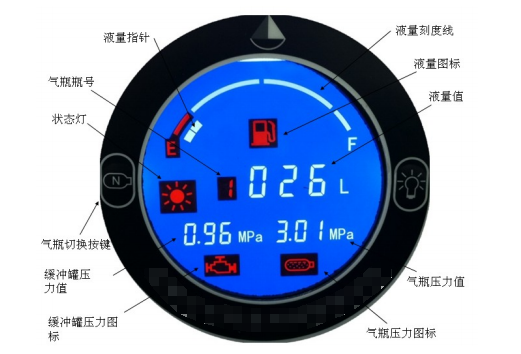
1.1. Verify that the gas cylinder is empty (no liquid) and that the PTFE core wire of the liquid level sensor is properly connected to the transmitter's liquid level sensor connector.
1.2. Lightly touch the Zero-Scale Calibration button. Zero-Scale Calibration is complete.
1.3. If calibration is successful, the status indicator will flash three times. If the calibration is invalid and the status indicator does not illuminate, it is most likely that there is a large amount of liquid in the gas cylinder. In this case, drain the liquid before performing zero-scale calibration.
2.1. Verify that the gas cylinder is full of liquid and that the PTFE core wire of the liquid level sensor is properly connected to the transmitter's liquid level sensor connector.
2.2. Lightly touch the Full-Scale Calibration button. Full-Scale Calibration is complete.
2.3. If calibration is successful, the status indicator will flash three times. If the calibration is invalid and the status indicator does not illuminate, it is most likely that the gas cylinder is far from full. In this case, refill the cylinder with liquid before performing full-scale calibration. Note: Invalid zero-scale or full-scale calibration does not affect the use of the liquid level meter; it may only affect test accuracy.
Check whether the vehicle's power cord is properly connected to the display, or whether the power supply is short-circuited or open-circuited.
Check whether the display signal cable is properly connected to the 2-core signal cable. Alternatively, check whether the main transmitter signal cable is properly connected to the 2-core signal cable.
Check whether the PTFE core wire of the liquid level sensor is properly connected to the transmitter liquid level sensor connector. Check whether the core wire is too short and not fully inserted. Reinstall the PTFE core wire correctly.